Tools tested: ChatGPT (DALL·E), Google Gemini, Midjourney, Adobe Firefly, Canva AI
Goal: See how beginner-friendly tools handle the same prompts, with minimal setup.
Summary:
- All five tools are easy to use and fast.
- Same prompt ≠ same vibe — each tool has a distinct look.
- Re-running the same prompt creates slightly different images (that’s normal).
- Firefly tends to keep a consistent “house style.”
- Canva AI improves a lot when you choose the right Style from its dropdown.
- Gemini outputs one image per prompt; most others give multiple.
- My personal favorite from this test: Midjourney. But honestly, any of these can do the job well for beginners.
- Human subjects can still show small deformities across all tools.
- For light beginner use, your final decision may simply be price (or what you already subscribe to).
Why I Ran This Test
I’m learning AI and documenting the journey for other beginners. I wanted to compare tools anyone can try without installing models or dealing with files. Plug-and-play only.
My Test Setup
- Same prompts across all tools
- Default settings where possible; minimal tweaks
- No post-editing before comparison
- Two versions per tool to test realism vs. stylization
Prompts Used
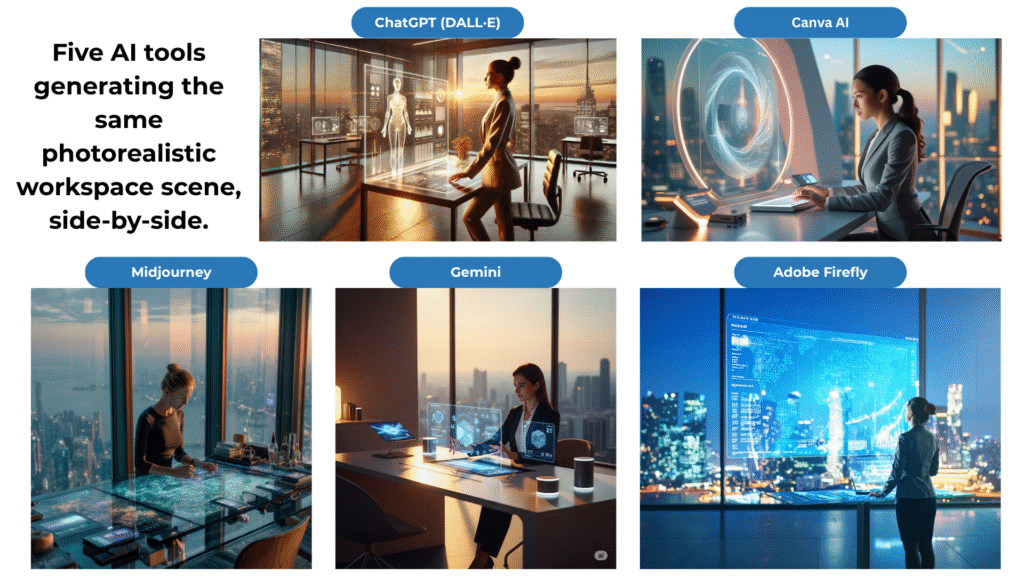
Photorealistic (Realism Stress Test)
Ultra-realistic minimalist futuristic workspace, bathed in warm ambient lighting. A professional woman in her 30s, wearing a sleek modern outfit, works at a transparent AI-powered holographic terminal. Surrounding her are high-tech digital gadgets and a panoramic city skyline visible through large glass windows. Soft shadows, cinematic depth of field, vibrant yet natural colors, 4K resolution.
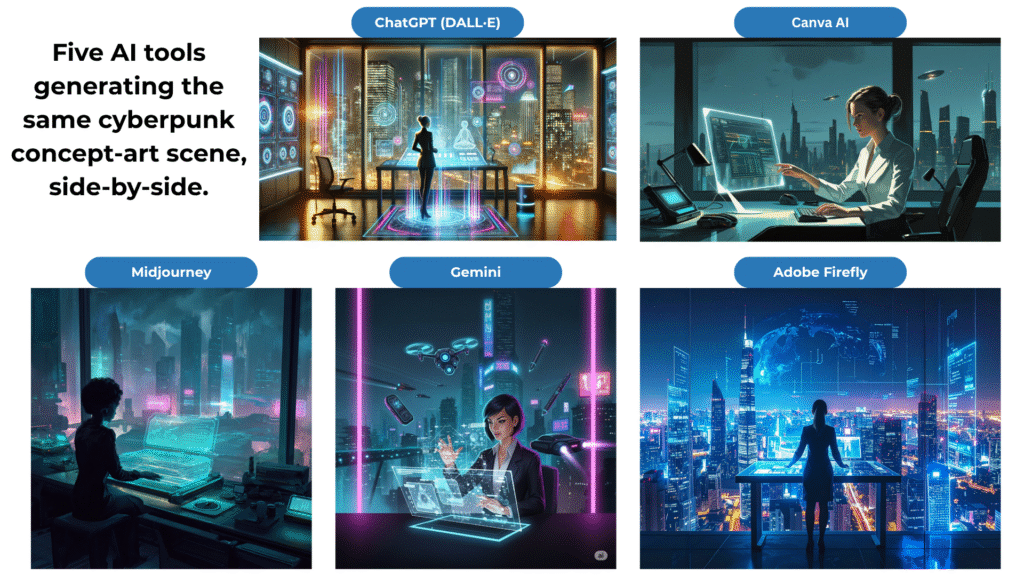
Artistic / Concept Art (Creativity Stress Test)
Digital concept art of a minimalist futuristic workspace, illuminated by glowing neon accents. A stylized professional woman in her 30s operates a transparent holographic terminal, surrounded by floating digital gadgets and a panoramic cyberpunk city skyline at night. Soft glowing shadows, painterly brush textures, vibrant color palette, highly detailed, 4K resolution.
My Observations
- All tools are easy + fast: I could generate images quickly with every tool.
- Different vibes from the same words: Even with identical prompts, outputs had noticeably different moods and styles.
- Reruns produce variations: Re-running the same prompt on the same tool gave slightly different images — expected behavior and useful for finding a favorite.
- Adobe Firefly consistency: Firefly tended to give a similar aesthetic “feel” across runs since I started using it.
- Canva AI tip: Using the Style dropdown (e.g., Cinematic, Creative) improved results a lot.
- Gemini limitation: Only generated one image per prompt; the others typically showed multiple options. I prefer having choices.
- Midjourney impressed me most: Best overall look during this test.
- Human subjects are still hard: Minor deformities showed up across tools occasionally.
- Beginner takeaway: All five can create good images. Focus on good prompts and what you already have access to; don’t chase a new subscription unless you need specific features.
Tool-by-Tool Notes
ChatGPT (DALL·E)
What I liked: Integrated, straightforward, quick to iterate.
Things to note: Fewer knobs than art-focused tools; still strong for general use.
Best for: Fast “type and get an image” with minimal friction.
Google Gemini
What I liked: Simple interface, beginner-friendly.
Things to note: One image per prompt limits quick side-by-side picks.
Best for: Casual generation, quick tests, and if you’re already in Google’s ecosystem.
Midjourney
What I liked: Highest overall visual quality in my test; great detail and mood.
Things to note: Runs on Discord; tiny learning curve at first.
Best for: When you care most about the final look and are okay with Discord.
Adobe Firefly
What I liked: Clean UI, consistent results, strong for photorealistic scenes.
Things to note: Tends to keep a recognizable “Firefly look” (which can be a plus if you like it).
Best for: Predictable, polished outputs — especially if you already use Adobe apps.
Canva AI
What I liked: The Style dropdown meaningfully changes results; super accessible.
Things to note: Pick the right Style (e.g., Photo vs. Digital Art) for your prompt.
Best for: Beginners building social graphics where you can generate → drop into a template fast.
What Stood Out To Me
| Tool | Images per prompt | Style Controls | What Stood Out | Watch-outs |
|---|---|---|---|---|
| ChatGPT (DALL·E) | 2 | Light | Very easy to use; quick results | Fewer “pro” toggles |
| Gemini | 1 | Light | Simple, clean | Only one image per run |
| Midjourney | 4 | Rich (via prompts & parameters) | Best look/variety in my test | Discord workflow |
| Adobe Firefly | 4 | Clear visual styles | Consistent, polished feel | Outputs can share a common vibe |
| Canva AI | 4 | Style dropdown helps a lot | Great for social workflows | Choose style carefully |
(These are my hands-on impressions from this test, not an exhaustive review.)
Tips That Helped Me Get Better Results
- Use specific nouns + lighting + mood (see my prompts above).
- Run the same prompt a few times and pick the best — variation is normal.
- Leverage style controls (e.g., Canva’s Style, Firefly’s mode, Midjourney parameters).
- Keep humans simple at first (framing, pose) to reduce deformities.
- Decide by access & price: If you already subscribe to one tool and like the output, you don’t need to sign up for another just to “keep up.”
Which One Should Beginners Pick?
Honestly, you can start with any of these and get good images with a strong prompt. If you already have access (Adobe, Canva, ChatGPT, etc.), use what you have. If quality is your top priority and you don’t mind Discord, Midjourney stood out for me in this test.
(Pricing changes and credit systems vary — check current plans and pick what fits your usage.)
Image Gallery
Wrap-Up
I learned that the prompt matters more than the platform for beginners — and small tool differences can shape the final vibe. If you’re just starting, pick one tool, copy my prompts, and experiment. You’ll be surprised how quickly you can get portfolio-ready images.
Disclosure
No affiliations. Opinions are my own, based on hands-on testing.